Studio Mode (⌘4) records and imports interviews and audio notes, transcribing them entirely on your Mac and linking spoken quotes directly to manuscript prose.
Recording & Importing Audio
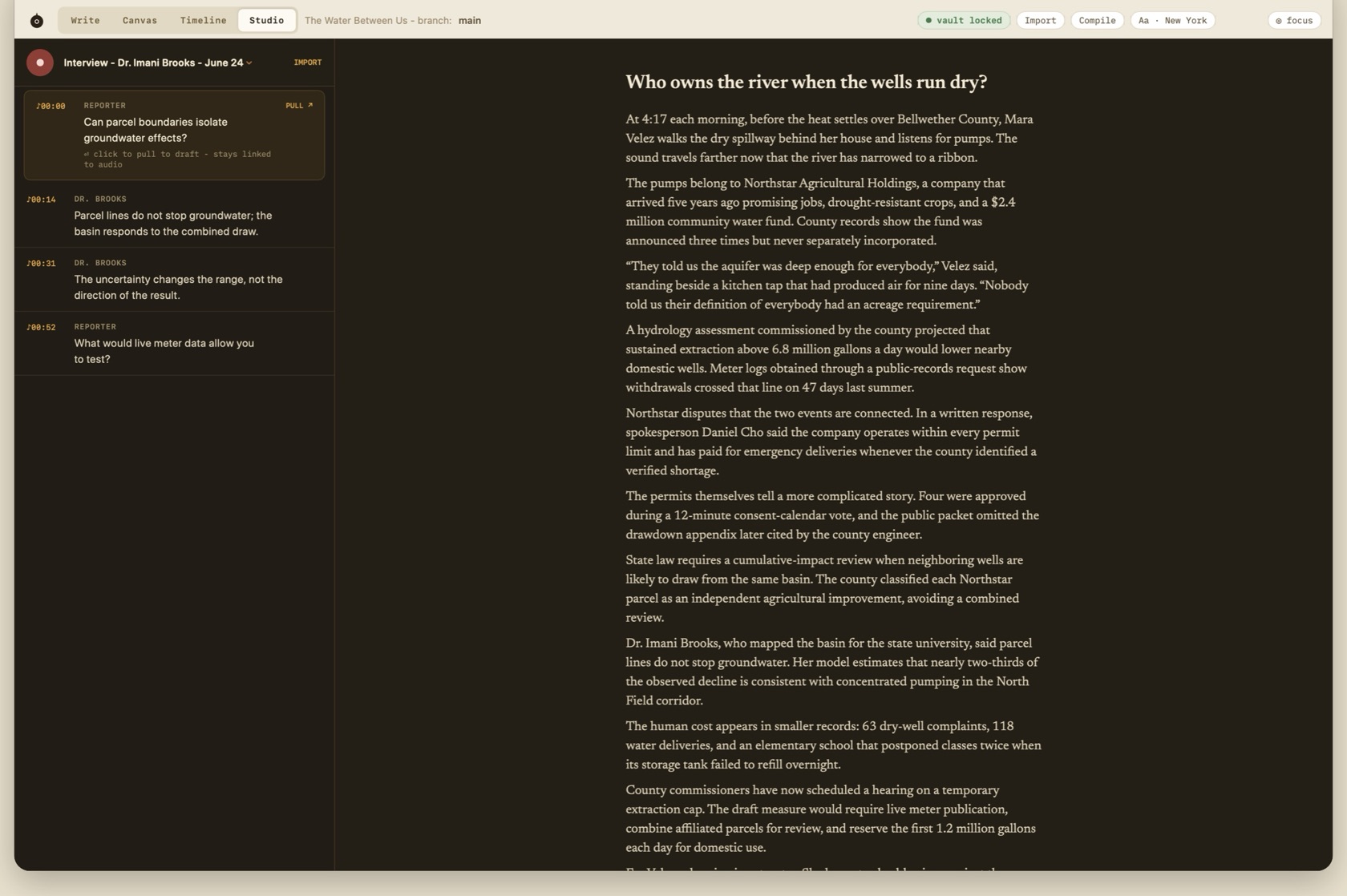
Record through the Mac microphone or import audio. Studio is a Night surface: waveform, then transcript rows labeled with time and speaker.
Transcription stays on the Mac. Apple Speech and CoreML run locally. The audio file is not uploaded to transcribe it.
- mm:ss · SPEAKER
- Each transcript row. The kicker is mono. The words are the transcript.
- ⏎
- Pulls that row to the caret in the draft and marks the row as pulled.
- ♪mm:ss
- The link left in the draft. Click it and playback starts at that second.
- ★ pulled to draft
- The row already used. It stays linked. Pulling does not detach the audio.
Local Machine Transcription
Transcription runs 100% on-device using Apple Speech and CoreML neural models. No audio is ever uploaded to external servers, protecting sensitive interviewees and sources.
Pull Quotes & Live ♪mm:ss Links
Pressing Enter on any transcript segment pulls the quote into your draft at the caret. The quote receives an inline ♪mm:ss audio link badge; clicking it jumps audio playback directly to that second.