SixTwelve Studio / Specimen
macOS & Linux · Free
Specimen
A precision vector specimen instrument and SVG engineering workbench, built for deterministic local inspection, geometric normalization, and production-grade code emission.
Free · macOS and Linux
The macOS build is universal and signed/notarized by Apple, opening on the first double-click on macOS 11 or newer. The Linux tarballs carry the desktop workbench and headless CLI, desktop entry, and icon set for ~/.local.
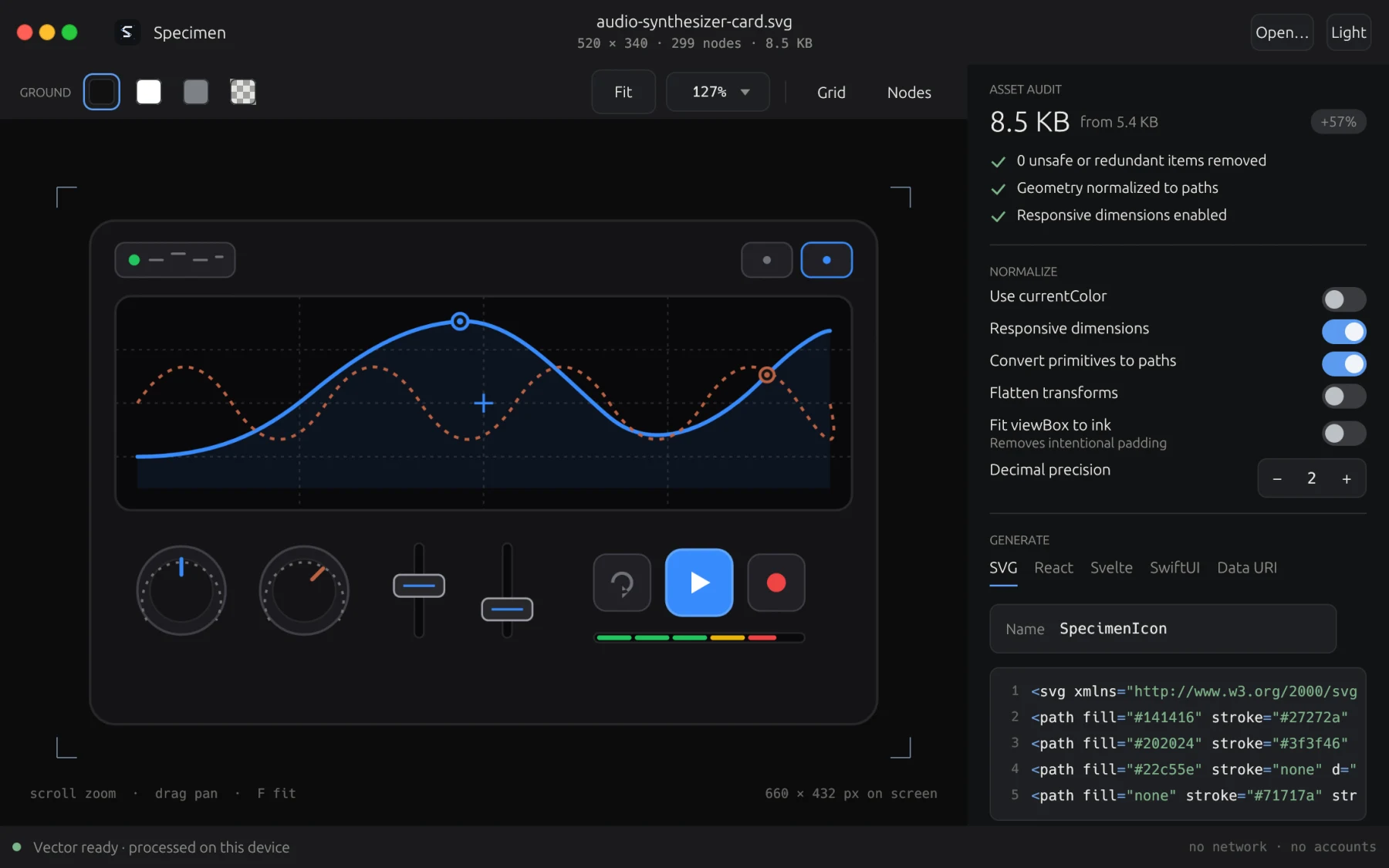
The workbench · interactive canvas with vector geometry inspection and live code generation
What it does not do
A design instrument should never leak your geometry or make outbound requests. Specimen runs strictly offline.
- Sign-in
- Open the app. There is nothing to sign into.
- Reporting
- Specimen does not send crash reports or usage. An untrusted SVG cannot call out.
- No network
- Purely offline processing. External entities, DTDs, and remote network fetches are rejected.
- No lock-in
- Standard SVG and native framework components. Everything runs locally on your machine.
What it does
Hardened SVG sanitizer
Rejects DTD declarations, entities, and hostile payloads. Strips scripts, event handlers, foreign objects, and embedded rasters.
Interactive desktop workbench
Fast pan and zoom canvas, 5 ground contrast modes, live coordinate inspection, and node overlay with Bézier control points.
8 production code targets
Generates clean, idiomatic components for React (TSX), React Native, Svelte, Vue, SwiftUI, Jetpack Compose, Flutter, and raw SVG.
Color normalization
Dynamic currentColor conversion, mask luminance preservation, and color inheritance controls for dark and light theme integration.
Multi-format raster pipeline
High-fidelity rendering powered by resvg and tiny-skia into PNG, WebP, and AVIF across arbitrary density scales (1x, 2x, 3x).
Dual desktop and CLI engine
Visual desktop app for design inspection and headless CLI for automated terminal scripts and CI asset pipelines.
The download
- macOS Universal build for Apple silicon and Intel. Signed and notarized by Apple, opening on first double-click on macOS 11 or newer. 4.1 MB
- Linux x86_64 Standalone tarball carrying the desktop workbench, headless CLI, desktop entry, and icon set for ~/.local. 3.8 MB
- Linux aarch64 The complete workbench package compiled natively for 64-bit ARM Linux systems with Wayland or X11. 3.6 MB
The disk image is signed and notarized under co.raastey.specimen, so
macOS opens it without a warning and you can check the signature yourself with
codesign -dv /Applications/Specimen.app. On Linux, unpack the tarball and
run ./install.sh; it installs the binary, desktop entry, and icons into
~/.local and touches nothing else.
A licence, if you want one on record
Specimen does not check a licence and will not start asking, so this changes nothing about the copy you download; the buttons above work without an address. It is here because a licence is how everything else in the studio is owned, and some people would rather hold the receipt than not.
One address, one licence, and it arrives by email as well. Already have one? Ask for it again.
Why it is free
Specimen is the vector workbench the studio uses to engineer its own icons and interfaces, and it earns its keep by existing rather than by being sold. There is no free tier above which something is paid, no account that would let us count you, and no plan to add either.
The source is at github.com/raastey/specimen-app, and the fastest way to propose a change is to open an issue or pull request there.
Requirements
macOS 11 or newer, Apple silicon or Intel. Signed and notarized.
Linux on x86-64 or arm64 · Wayland or X11 · a Vulkan/Glow driver · glibc 2.36 or newer.
Support
Anything about either build: hello@sixtwelve.studio. A real person answers, and there is no ticket portal.